Transcribe research interviews offline under GDPR
Transcribe qualitative interviews on your own computer, pseudonymise the transcript and keep interview data away from third-party servers.
Published
Transcribe the recordings on your own computer with a local speech model, so no transcription service ever receives them. Then check the transcript against the audio, replace names with codes, and store and delete the files as your data management plan says.
Local transcription removes one processor from your project. Consent, a legal basis and your institution’s review still apply, so check the details with your data protection officer.
This guide uses TrueScribe on Windows or Linux. The same steps work with any local transcription tool.
Why the transcription step matters
An interview recording is personal data. The voice, the names and the places in it relate to an identifiable person under Article 4(1) GDPR. Qualitative interviews often go further and touch health, political opinions or religious beliefs. Those are special categories under Article 9(1), with stricter conditions for processing.
An online transcription service processes that data on your behalf. Article 28 then requires a binding contract with the service as your processor, and servers outside the EU bring in the transfer rules of Chapter V. When you transcribe the recording on your own machine, that step has no processor at all.
Download the models before the first interview
TrueScribe runs Whisper locally and suggests a model that suits your hardware. It downloads the model once, on first use, and then reuses it offline. A graphics card is not required. TrueScribe runs on the CPU and uses a Vulkan runtime when your hardware supports it.
- Install TrueScribe and transcribe a short test recording that contains no research data. A dictation of your own voice is enough.
- With Pro, activate your licence and run speaker detection on the same test file, so that model downloads too. Try every feature you plan to use once while you are still online.
- If your project requires an offline workstation, disconnect from the network now, before you open any interview recording.
TrueScribe uses the network for model downloads, media links, licence checks, updates and error reporting. Those services may receive technical connection or diagnostic data. Your recordings and transcripts stay on your computer, as the privacy policy explains. With the models in place, transcription itself needs no connection.
Transcribe the interviews on your machine
Drop the audio or video file into TrueScribe. It detects the spoken language automatically, or you select it. TrueScribe decodes and transcribes the file locally, with no upload step and no account.
The Free version transcribes local files without a time or file limit. Pro adds a batch queue, so you can add a whole set of interviews at once.
Check the transcript against the recording
Speech recognition makes mistakes, especially with names, dialect and overlapping speech. Play the recording back against the waveform and correct the text where it differs.
With Pro, TrueScribe detects speakers locally and lets you name them. Name them with your study codes, such as “Interviewer” and “P07”, rather than with real names.
Pseudonymise the transcript
- Replace names, employers, places and other identifying details with codes or neutral descriptions.
- Keep the list that links codes to people separate from the transcripts. Article 4(5) GDPR requires that separation for data to count as pseudonymised.
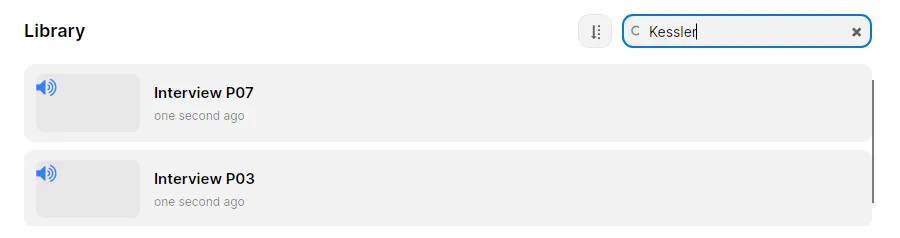
- Search the TrueScribe library for each real name on your key list. The search covers every transcript, so you do not have to open each file. Repeat until it returns nothing.
Under Recital 26, pseudonymised transcripts are still personal data. Pseudonymisation lowers the risk but leaves the transcripts within the regulation.
Keep every model local
AI Research answers questions about a transcript, and Pro translates transcripts locally into 25 languages. Transcription, translation and AI Research can each use a cloud provider you configure instead. For interview data, leave all three on a local model.
A cloud provider receives the content it needs for each request, which can include audio and transcript text. That makes it a processor, so you need an Article 28 contract with it as well.
Store, export and delete
TrueScribe keeps recordings and transcripts together in a library on your computer. Protect that computer with full-disk encryption, such as BitLocker on Windows or LUKS with cryptsetup on Linux. Article 32 names encryption as one of the security measures to consider.
When the transcript is ready for analysis, export it. The Free version exports TXT, SRT and WebVTT. Pro adds documents and structured data. TrueScribe does not code or analyse interviews, so the export is what you import into your analysis software.
Article 5(1)(e) limits how long you keep data in identifiable form, with room for research under Article 89(1). Write down when you will delete the original recordings. You can delete local recordings, transcripts and history from your device, so include the TrueScribe library in that plan.
What local transcription does not settle
Your project still needs informed consent, a legal basis, an information sheet for participants and, for high-risk processing, a data protection impact assessment under Article 35. Your ethics committee and data protection officer decide those. With local transcription, they have one processor fewer to assess.
Download TrueScribe to start, or see how it compares with noScribe, another local tool, and with f4, which uploads recordings to its provider’s servers.