WAV to text: transcribe studio and field recordings
Transcribe a WAV export from your DAW, a field recorder or a meeting recording on your own Windows or Linux computer, however large the file, with no upload.
Published
A WAV file is uncompressed audio: the export from a digital audio workstation, the original from a field recorder, a dictation from an older handheld, or a meeting TrueScribe recorded itself. To turn WAV to text, drop the file into TrueScribe and it transcribes the recording on your Windows or Linux computer. There is no upload, no account, and no file or time limit in the free version.
This guide covers where WAV files come from, what their size means for transcription, how the job runs in TrueScribe, and what Free and Pro include.
Where the WAV comes from
Audio software writes WAV because it keeps every sample. A digital audio workstation exports a WAV mix of a session, a voice-over or a podcast episode before anything is compressed. Handheld field recorders save WAV at 44.1 or 48 kHz, and many dictation devices offer it. TrueScribe’s own meeting recording writes a WAV file with your microphone on one channel and the call audio on the other.
Uncompressed audio is large. A stereo WAV at CD quality takes about 10 MB per minute, so an hour of audio is around 600 MB. TrueScribe reads the file from disk where it is, and the free version has no file or time limit, so a long session is a matter of waiting, not of splitting the file.
TrueScribe accepts MP3, WAV, M4A, AAC, FLAC, OGG and Opus audio, and MP4, MKV, MOV, WebM, AVI, WMV, FLV and M4V video.
How it works in TrueScribe
- Drop the WAV anywhere in the TrueScribe window, or select Transcribe Files on the home screen and pick the file.
- TrueScribe detects the spoken language. If the recording is in one language you know, you can select it instead.
- Wait for the transcript. It appears in the library next to the recording.
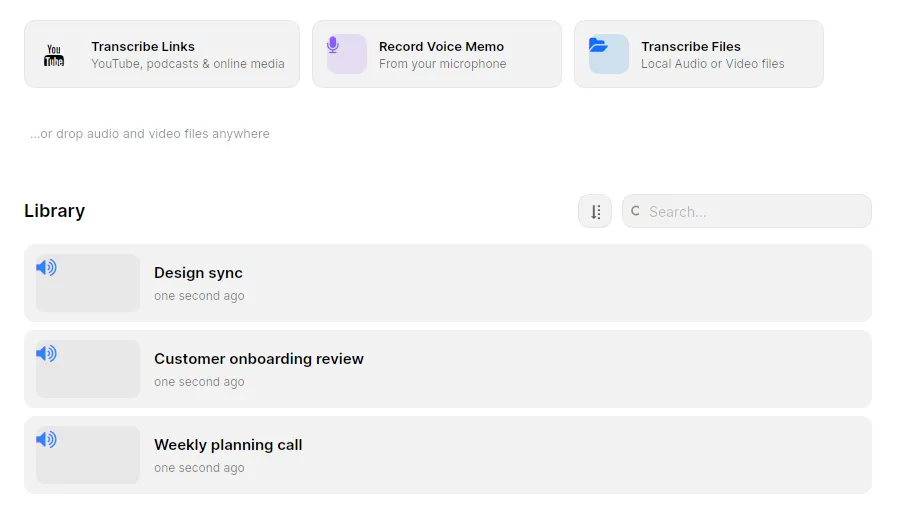
TrueScribe runs Whisper on your computer. It suggests a model that suits your hardware, downloads it once on first use and reuses it offline after that. AMD, Intel and NVIDIA graphics cards speed up transcription with no CUDA toolkit to install, and a machine without a graphics card transcribes on the CPU. A two-hour session takes longer on a slower computer, but the file never leaves it.
Then play the WAV back against the waveform and correct the text where it differs, with undo and redo. Names and technical terms that Whisper mishears go into the custom vocabulary once, and a replacement rule fixes a term it always gets wrong.
What you get
- Unlimited WAV transcription (Free). Every available transcription model, with no file or time limit.
- Editing, playback and search (Free). Correct the text against the audio, and search the text of every transcript in the library later.
- AI Research (Free). Ask questions about a session with a local model, or with a cloud provider you configure.
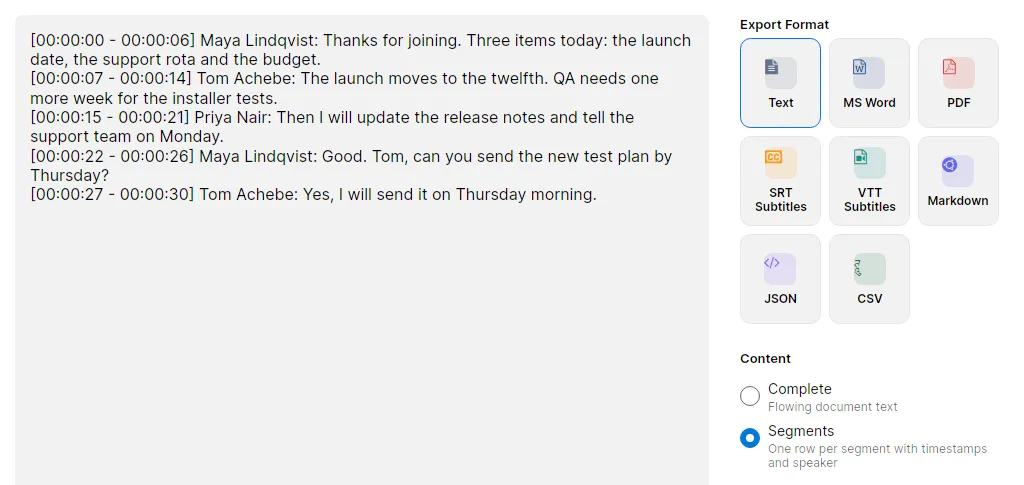
- Export as TXT, SRT and WebVTT (Free). Under Content, Segments keeps the timestamps and Complete exports continuous prose. The preview shows the file before you save it.
- Custom vocabulary and replacements (Free). Names and jargon spelled right from the next transcript on.
- Speaker detection and naming (Pro). Label who said what in an interview or a panel recorded to one WAV.
- Local translation (Pro). Translate the transcript into 25 languages on your computer and keep the original.
- Batch transcription and watch folders (Pro). Queue a day of recordings at once, or point TrueScribe at the folder your recorder or DAW exports into.
- More export formats (Pro). DOCX, PDF, Markdown, JSON and CSV.
Limits
TrueScribe transcribes one file as one recording. It does not edit the audio, so there is no trimming, no noise reduction, no mixing and no conversion to another format. If your session holds one track per microphone, export the mix you want transcribed from the DAW first. Whisper makes mistakes with names and numbers, and a room microphone far from the speaker produces more of them, so read the transcript against the audio before you rely on it. Speaker names need Pro. The first transcription needs a connection to download the model. TrueScribe runs on Windows and Linux, not on macOS.
Related guides
- MP3 to text covers the compressed file you get from a phone, a podcast feed or an older recorder.
- Transcribe M4A to text on your own computer covers the format iPhones and Zoom save.
- If the WAV is an interview, see how TrueScribe compares with noScribe, a free open-source app built for qualitative research that also transcribes on your own computer.
Download TrueScribe and drop in your first WAV, or see what Pro includes.