7 transcription apps for Windows and Linux compared
Local Whisper apps, a subtitle editor and two online services for turning recordings into text on Windows and Linux, with platforms, pricing and sources.
Published
Five of these seven apps transcribe on your own computer; two send the recording to a server. Three questions decide which one fits. Does the recording have to stay on your machine? Do you need the work after the transcript (speakers, translation, search, export) in the same app? Do you pay once, by the minute or by the month?
| App | Where it runs | Price |
|---|---|---|
| TrueScribe | Your computer | Free; Pro US$64 once |
| Buzz | Your computer | Free, open source |
| Vibe | Your computer | Free, open source |
| noScribe | Your computer | Free, open source |
| Subtitle Edit | Your computer, or an online engine | Free, open source |
| Otter.ai | Otter.ai’s servers | Free plan, subscriptions |
| f4 | Provider’s servers in Germany | Licence plus minute quotas |
Checked in October 2026. Details about other products change; their own pages are the authority, and each entry links to them.
TrueScribe
TrueScribe runs Whisper on your own Windows or Linux machine. It picks a model that suits your hardware, downloads it once on first use and then transcribes offline, on the CPU or with a Vulkan runtime. There is no account and no upload step.
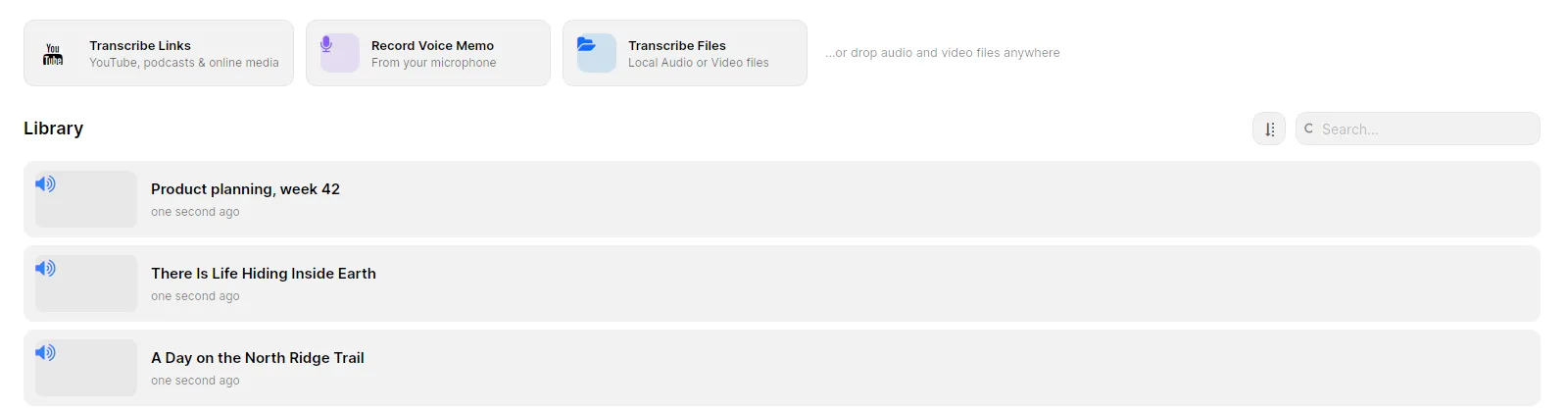
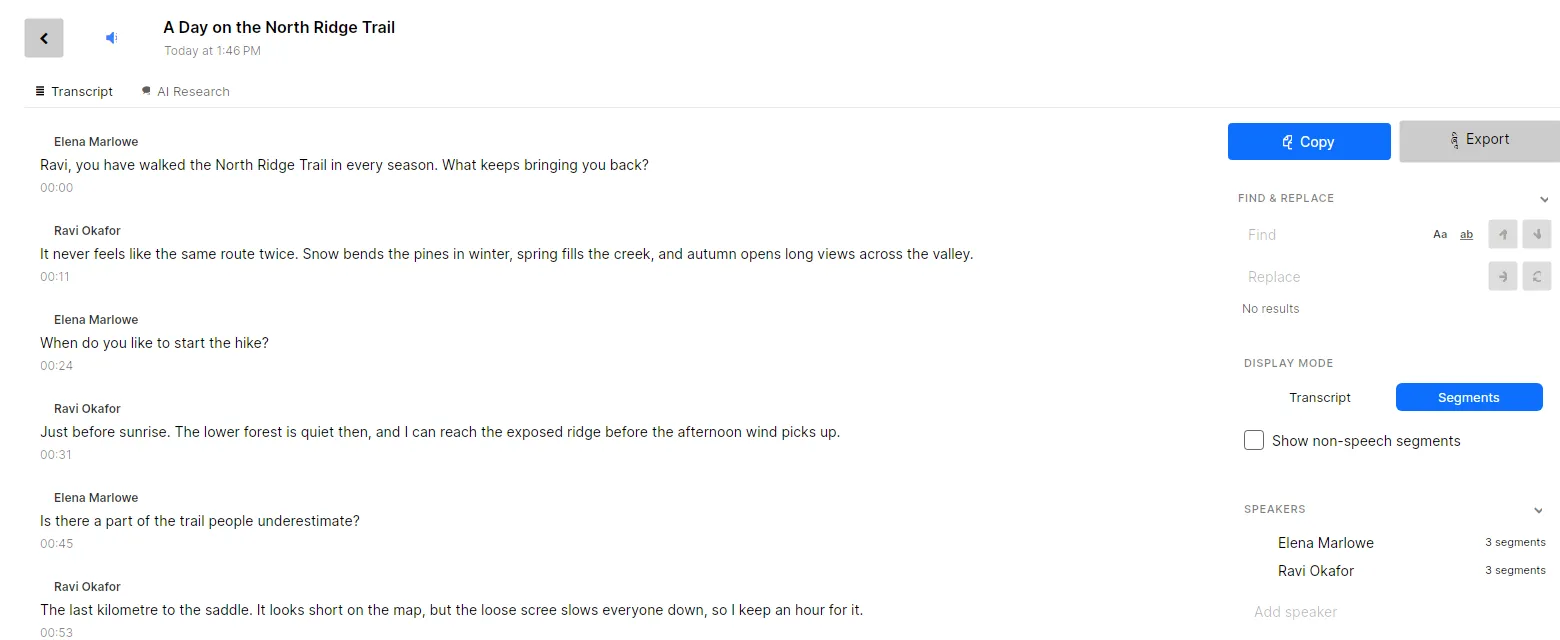
The difference from the other local apps is what happens after the transcript. Recordings and transcripts live together in a searchable library. You play back against the waveform and correct the text with undo and redo, and AI Research answers questions about a transcript with a local model. Free covers unlimited local-file transcription, editing, search and TXT, SRT and WebVTT export. Pro is a one-time purchase for up to three devices and adds speaker detection and naming, local translation into 25 languages, batch transcription, media links and richer exports. See the full Free and Pro comparison.
TrueScribe does not run on macOS.
Buzz
Buzz is an MIT-licensed desktop app that transcribes and translates offline with Whisper. Its README lists file and YouTube-link transcription, live transcription from the microphone, speaker identification, a watch folder that transcribes new files automatically, a command-line interface and export to TXT, SRT and VTT. It supports CUDA on Nvidia cards and Vulkan on most other GPUs.
On Windows the installer is unsigned, so SmartScreen warns on first run. On Linux it ships as a Flatpak, Snap or AppImage.
Pick Buzz when you want a free, scriptable transcriber with a live microphone mode and do not need a library or translation beyond Whisper’s own.
Vibe
Vibe is an MIT-licensed app built on whisper.cpp that runs on Windows, macOS and Linux. Its README lists batch transcription, speaker diarization, Whisper, Nemotron and Parakeet models, GPU support for Nvidia, AMD and Intel, and export to SRT, VTT, TXT, HTML, PDF, JSON and DOCX. Summaries use the Claude API or a local Ollama model, and it can transcribe audio from websites such as YouTube.
Pick Vibe when you have a stack of files to batch and want the widest free export list of the local apps.
noScribe
noScribe is free, GPL-3.0 software built for qualitative research. It runs faster-whisper and pyannote locally on Windows, macOS and Linux, distinguishes speakers and understands around 60 languages, according to its README. The free tool includes speaker detection, which TrueScribe reserves for Pro.
Pick noScribe when the recordings are research interviews, speaker labels matter and you want open source you can inspect. Our comparison with noScribe goes into the details.
Subtitle Edit
Subtitle Edit is an open-source subtitle editor for Windows, macOS and Linux. Under Video → Speech to text it runs local engines such as Whisper CPP, Purfview Faster Whisper XXL and Crisp ASR, or online engines you configure with your own API key. Batch mode writes an .srt next to each video, and post-processing fixes timings, casing and line lengths.
Pick Subtitle Edit when the result is a subtitle file for a video rather than a transcript to read, search or translate. The online engines are optional; the local ones keep the audio on your computer.
Otter.ai
Otter.ai is a cloud meeting assistant. It joins live calls, transcribes on its servers and shares notes across a team, with a free plan and subscriptions. Its supported languages are English, Spanish, French, German, Japanese and Simplified Chinese, and it requires an account.
Pick Otter.ai when the job is live meetings and team notes. It is the wrong tool for recordings that must not leave your machine. See our comparison with Otter.ai.
f4
f4 by audiotranskription uploads recordings, encrypted, to the provider’s servers in Germany and transcribes 48 languages. You buy an f4 licence plus prepaid hour quotas billed by the minute. In return, qualitative coding and analysis are part of the same tool.
Pick f4 when your institute already licenses it and you code interviews inside it. Our comparison with f4 covers the cost and the upload step.
How to choose
- If the recordings must stay on your machine, choose TrueScribe, Buzz, Vibe, noScribe, or Subtitle Edit with a local engine.
- If you need review, speaker names, translation and search in one place, choose TrueScribe. For research interviews on a budget, choose noScribe.
- If the output is a subtitle file, choose Subtitle Edit, or use TrueScribe’s SRT and WebVTT export.
- For live meetings, choose Otter.ai.
- For research interviews with coding in the same tool, choose f4.
If your recordings are interviews, transcribing them offline under GDPR explains what local transcription settles and what it does not. Download TrueScribe to try the first option.